How to install theme

2786 views August 9, 2020 August 27, 2020 0

Welcome to Chimp Studio. Thank you for purchasing Job Career Theme. This article will help you how to install theme.
There are different methods for installing theme.
These methods include :

1- Installing via WordPress Dashboard
2- Installing theme via FTP client

Installing via WordPress Dashboard:

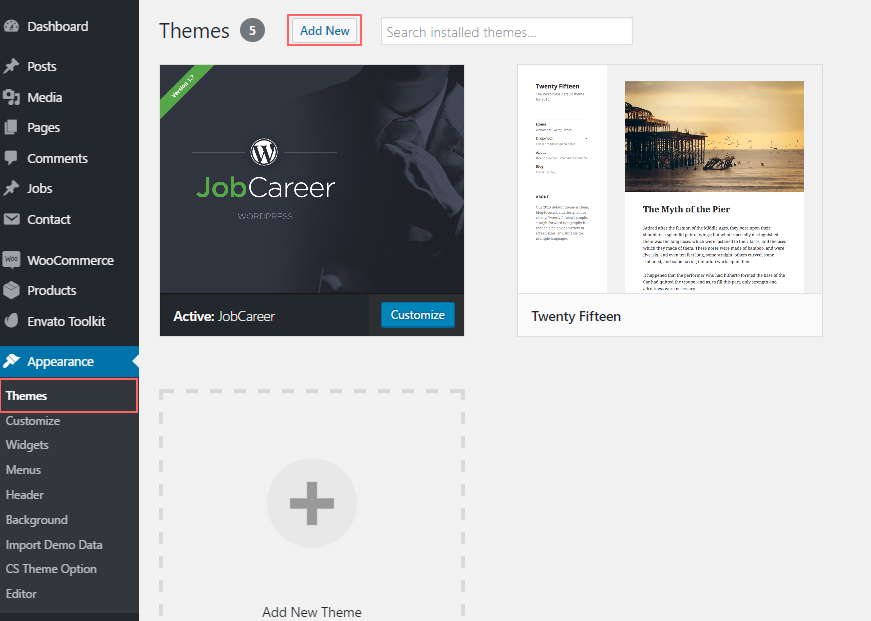
Before you install, please take care of following things 1- You must have WordPress installed on your domain. If not, you can see following tutorial on how to install WordPress How to Install WordPress 2– Once You have installed WordPress, login to wp-admin and navigate to Appearance >> Themes >> Click on Add new and then click on Browse. Select jobcareer.zip theme from your desktop / computer and hit upload. It will take a while to upload and install theme, Let it be. Once it is installed, you will be prompted to activate theme then. Click on activate theme. Once you have activated, you will see “install required plugins” screen.
You can install all of them at once by simply clicking “all” and from drop-down select “install”. All plugins will be installed and activated automatically, there you go. You have successfully installed and activated “JobCareer Theme” via WordPress dashboard.

Installing theme via FTP clients

Before you install, please take care of following things; 1- You must have following FTP credentails     FTP Host / server     FTP User name     FTP Password You can get these from you Cpanel or hosting panel under FTP accounts page. If you find any difficulty, you can contact your hosting provider. 2- You must have ftp client installed on your system, following software can be used     File zilla (the most easy to use software for windows platform)     Transmit (Mac OS X)     CyberDuck (for both windows and mac) Once you have installed FTP client, use you FTP credentials to login to you ftp. If you want to install WordPress on your root domain name (like example.com), Then you need to upload WordPress files to your website’s root directory. Usually this directory is called /public_html/. On left side is folders on your local computer, navigate to the folder where you have extracted downloaded theme package. (Downloaded theme means the package you download from themeforest after purchase). Drag it to the right side.
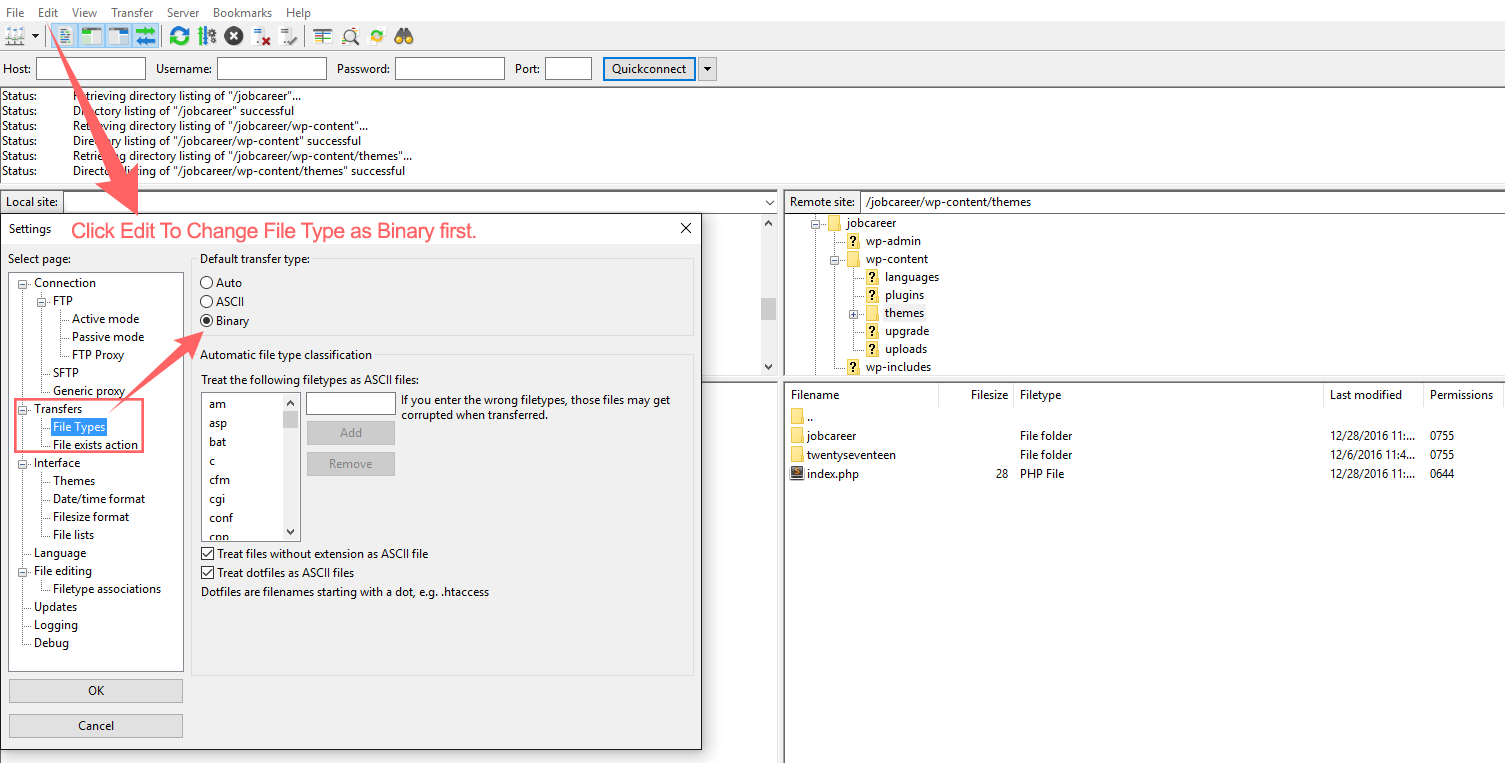
Now login to your WP Dashboard and activate theme from Appearance >> Themes You are done!


content-1701

sabung ayam online

yakinjp

yakinjp

rtp yakinjp

slot thailand

yakinjp

yakinjp

yakin jp

ayowin

yakinjp id

maujp

maujp

sv388

taruhan bola online

maujp

maujp

sabung ayam online

sabung ayam online

judi bola online

sabung ayam online

judi bola online

slot mahjong ways

slot mahjong

sabung ayam online

judi bola

live casino

sabung ayam online

judi bola

live casino

slot mahjong

sabung ayam online

slot mahjong

118000616

118000617

118000618

118000619

118000620

118000621

118000622

118000623

118000624

118000625

118000626

118000627

118000628

118000629

118000630

118000631

118000632

118000633

118000634

118000635

118000636

118000637

118000638

118000639

118000640

118000641

118000642

118000643

118000644

118000645

118000646

118000647

118000648

118000649

118000650

118000651

118000652

118000653

118000654

118000655

118000656

118000657

118000658

118000659

118000660

118000661

118000662

118000663

118000664

118000665

118000666

118000667

118000668

118000669

118000670

118000671

118000672

118000673

118000674

118000675

118000676

118000677

118000678

118000679

118000680

118000681

118000682

118000683

118000684

118000685

118000686

118000687

118000688

118000689

118000690

128000676

128000677

128000678

128000679

128000680

128000681

128000682

128000683

128000684

128000685

128000686

128000687

128000688

128000689

128000690

128000691

128000692

128000693

128000694

128000695

128000696

128000697

128000698

128000699

128000700

128000701

128000702

128000703

128000704

128000705

128000706

128000707

128000708

128000709

128000710

128000711

128000712

128000713

128000714

128000715

128000716

128000717

128000718

128000719

128000720

128000721

128000722

128000723

128000724

128000725

128000726

128000727

128000728

128000729

128000730

138000421

138000422

138000423

138000424

138000425

138000426

138000427

138000428

138000429

138000430

138000431

138000432

138000433

138000434

138000435

138000431

138000432

138000433

138000434

138000435

138000436

138000437

138000438

138000439

138000440

208000341

208000342

208000343

208000344

208000345

208000346

208000347

208000348

208000349

208000350

208000351

208000352

208000353

208000354

208000355

208000356

208000357

208000358

208000359

208000360

208000361

208000362

208000363

208000364

208000365

208000366

208000367

208000368

208000369

208000370

208000371

208000372

208000373

208000374

208000375

208000376

208000377

208000378

208000379

208000380

208000381

208000382

208000383

208000384

208000385

208000386

208000387

208000388

208000389

208000390

208000391

208000392

208000393

208000394

208000395

208000396

208000397

208000398

208000399

208000400

208000401

208000402

208000403

208000404

208000405

208000406

208000407

208000408

208000409

208000410

208000411

208000412

208000413

208000414

208000415

208000416

208000417

208000418

208000419

208000420

208000421

208000422

208000423

208000424

208000425

208000426

208000427

208000428

208000429

208000430

238000211

238000212

238000213

238000214

238000215

238000216

238000217

238000218

238000219

238000220

238000221

238000222

238000223

238000224

238000225

238000226

238000227

238000228

238000229

238000230

content-1701