Server & php.ini requirements for Directory box Theme

887 views November 21, 2017 July 24, 2018 0

In this article, we will be learning how to “Import Demos”. Importing demo content is always a big challenge with WordPress themes, but we have made this easier. Just a few steps and you will have your site just like our demo content.

1. Recommended Plugin Installation

To begin with, first you need to have theme and recommended plugins installed and activated on your site.

WP-Directorybox Manager (our custom post type management plugin)
Directory Box Framework (necessary includes and functionality supports are included with this plugin)

CS Icons Manager (For the icons management)
Slider Revolution (for slider management)

2. PHP.ini’s Post and memory configurations

Okay, Once you have installed these, then navigate to Directory / Import demo data in wordpress admin dashboard.  To have demo data as per live demo you need to ensure following configurations in your php.ini file.

upload_max_filesize * = min 128M 
memory_limit * = min 256M
post_max_size * = min 128M (For large data websites, post_max_size needs to be increased as per need)
max_execution_time * above 300
allow_url_fopen * should be enabled in your php.ini file to help import demo data from other API server. (You can disable after successful import!)
max_input_vars * above 5000

- cURL Support should be enabled in php.ini
- Zip should be enabled in php.ini
- Json Support should be enabled in php.ini
- XML Support should be enabled in php.ini


Note: Memory Unit must have to be “M” to get recognized by demo importer. !

3. Installing Demo

If these settings match your configurations in PHP.ini file, then you will see green tick marks which means all requirements are okay. As these settings are already met, click on next step and you will see a screen asking you to put purchase code*


*You can find you purchase code from your theme forest dashboard > Downloads >DirectoryBox> purchase code. If you already used your purchase code and giving error: “THE PURCHASE CODE IS BEING USED ON ANOTHER SITE. PLEASE DEREGISTER IT FROM THERE AND THEN TRY AGAIN”. Than follow article to deregister and release your purchase code here: http://chimpgroup.com/knowledgebase/how-to-de-register-purchase-code/
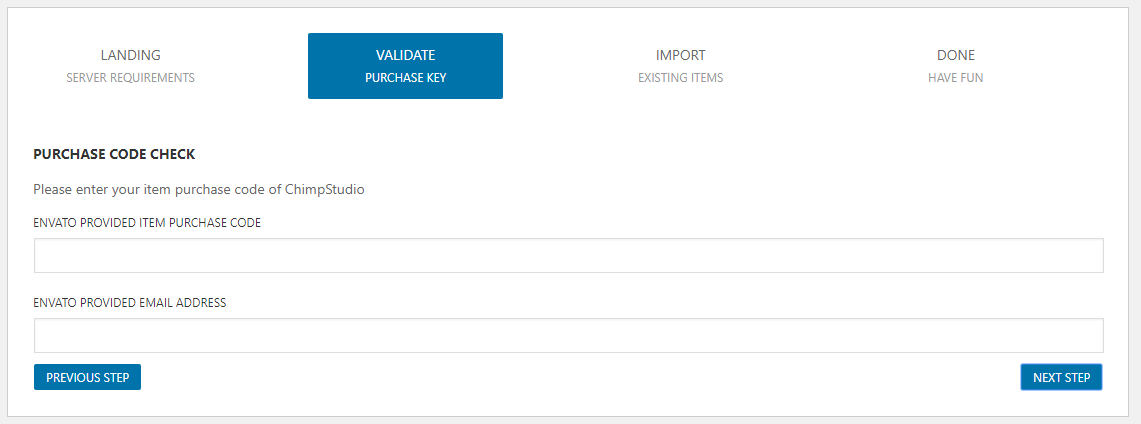
* Input your valid purchase code, after validation, you will see list of demos available to import. Select demo of your choice, lets select default DirectoryBox demo and click on next.
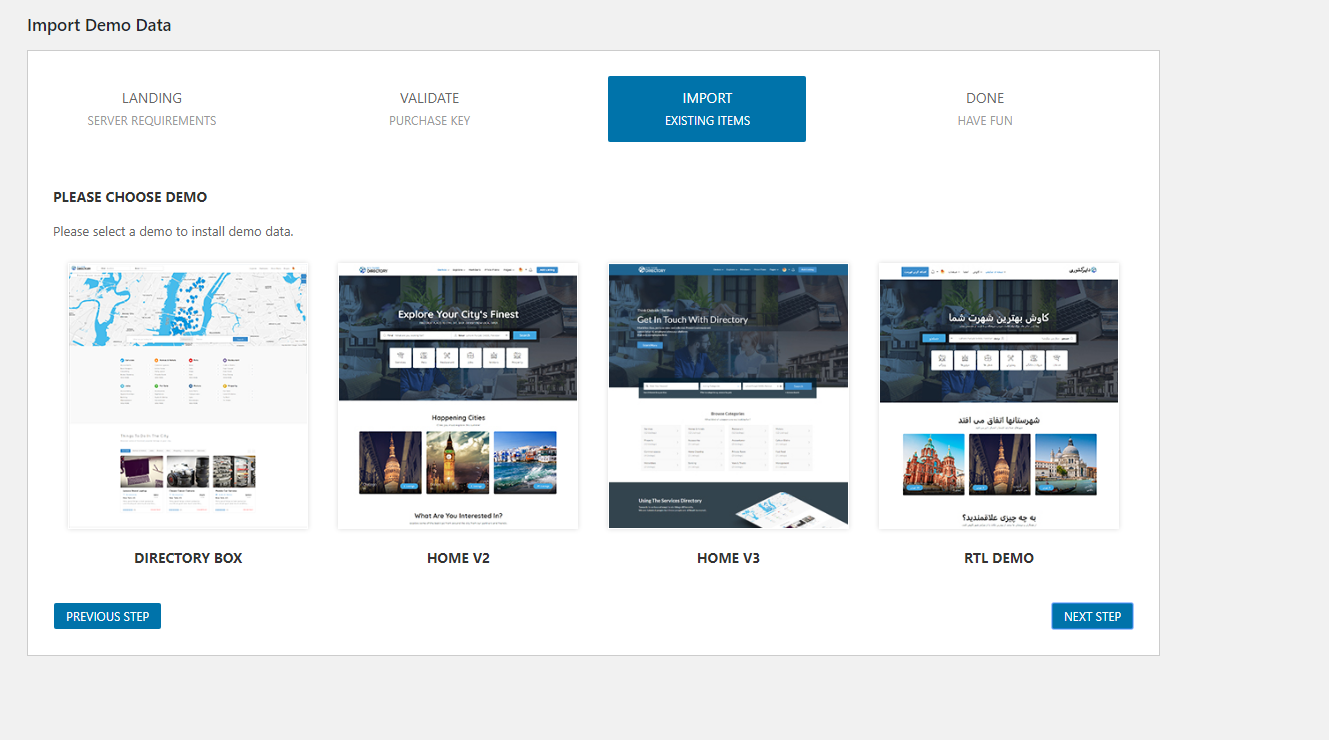
You will see link of items to import. Let all of them checked and click on next.

A screen will appear showing demo data is being imported, it usually takes 1 minute to 5 minutes depending upon your server settings and internet speed. For me, it gets imported in less then a minutes. Upon completion, you will see a success message saying all demo has been imported.

Open a new tab and enter your website URL to see if the demo has been imported. Hit Yes, if article is helpful.!


content-1701

yakinjp


sabung ayam online

yakinjp

yakinjp

rtp yakinjp

yakinjp

judi bola online

slot thailand

yakinjp

yakinjp

yakin jp

ayowin

yakinjp id

mahjong ways

judi bola online

mahjong ways 2

JUDI BOLA ONLINE

maujp

maujp

sabung ayam online

sabung ayam online

mahjong ways slot

sbobet88

live casino online

sv388

taruhan bola online

maujp

maujp

maujp

maujp

ALEXASLOT138

ALEXASLOT138

sabung ayam online

118000381

118000382

118000383

118000384

118000385

118000386

118000387

118000388

118000389

118000390

118000395

118000396

118000397

118000398

118000399

118000400

118000401

118000402

118000403

118000404

118000405

118000406

118000407

118000408

118000409

118000410

118000411

118000412

118000413

118000414

118000415

118000416

118000417

118000418

118000419

118000420

118000421

118000422

118000423

118000424

118000425

128000491

128000492

128000494

128000497

128000500

128000501

128000502

128000503

128000504

128000505

128000506

128000507

128000508

128000509

128000510

128000511

128000512

128000513

128000514

128000515

128000516

128000517

128000518

128000519

128000520

168000486

168000487

168000488

168000490

168000491

168000492

168000493

168000494

168000495

168000496

168000497

168000498

168000499

168000500

168000501

168000502

168000503

168000504

168000505

168000506

168000507

168000508

168000509

168000510

168000511

168000512

168000513

168000514

168000515

178000651

178000654

178000656

178000657

178000659

178000660

178000661

178000665

178000666

178000667

178000668

178000669

178000670

178000671

178000672

178000673

178000674

178000675

178000676

178000677

178000678

178000679

178000680

178000681

178000682

178000683

178000684

178000685

178000686

178000687

178000688

178000689

178000690

178000691

178000692

178000693

178000694

178000695

208000146

208000147

208000148

208000149

208000150

208000151

208000152

208000153

208000154

208000155

208000156

208000157

208000158

208000159

208000160

208000161

208000162

208000163

208000164

208000165

228000337

228000339

228000340

228000341

228000342

228000344

228000346

228000347

228000348

228000349

228000350

228000351

228000352

228000353

228000354

228000355

228000356

228000357

228000358

228000359

228000360

228000361

228000362

228000363

228000364

228000365

238000466

238000467

238000468

238000469

238000470

238000471

238000472

238000473

238000474

238000475

238000476

238000477

238000478

238000479

238000480

238000481

238000482

238000483

238000484

238000485

238000486

238000487

238000488

238000489

238000490

238000491

238000492

238000493

238000494

238000495

238000496

238000497

238000498

238000499

238000500

238000501

238000502

238000503

238000504

238000505

238000506

238000507

238000508

238000509

238000510

238000511

238000512

238000513

238000514

238000515

238000516

238000517

238000518

238000519

238000520

238000521

238000522

238000523

238000524

238000525

content-1701